Logging activities
Everything anyone does in the garden, and the handful of choices that make an entry useful later.
Updated October 8, 2026
An activity is a record of something someone did. Watering, weeding, pruning, feeding, moving a seedling, or just a note about how something looks.
This is the part of Grow Food Together everything else stands on. The dashboard reads it to work out what needs attention, the analytics add it up, the weekly digest summarizes it, and the assistant reads it when you ask what happened to a plant. A garden with no log is a garden the app cannot tell you anything about.
What you can log
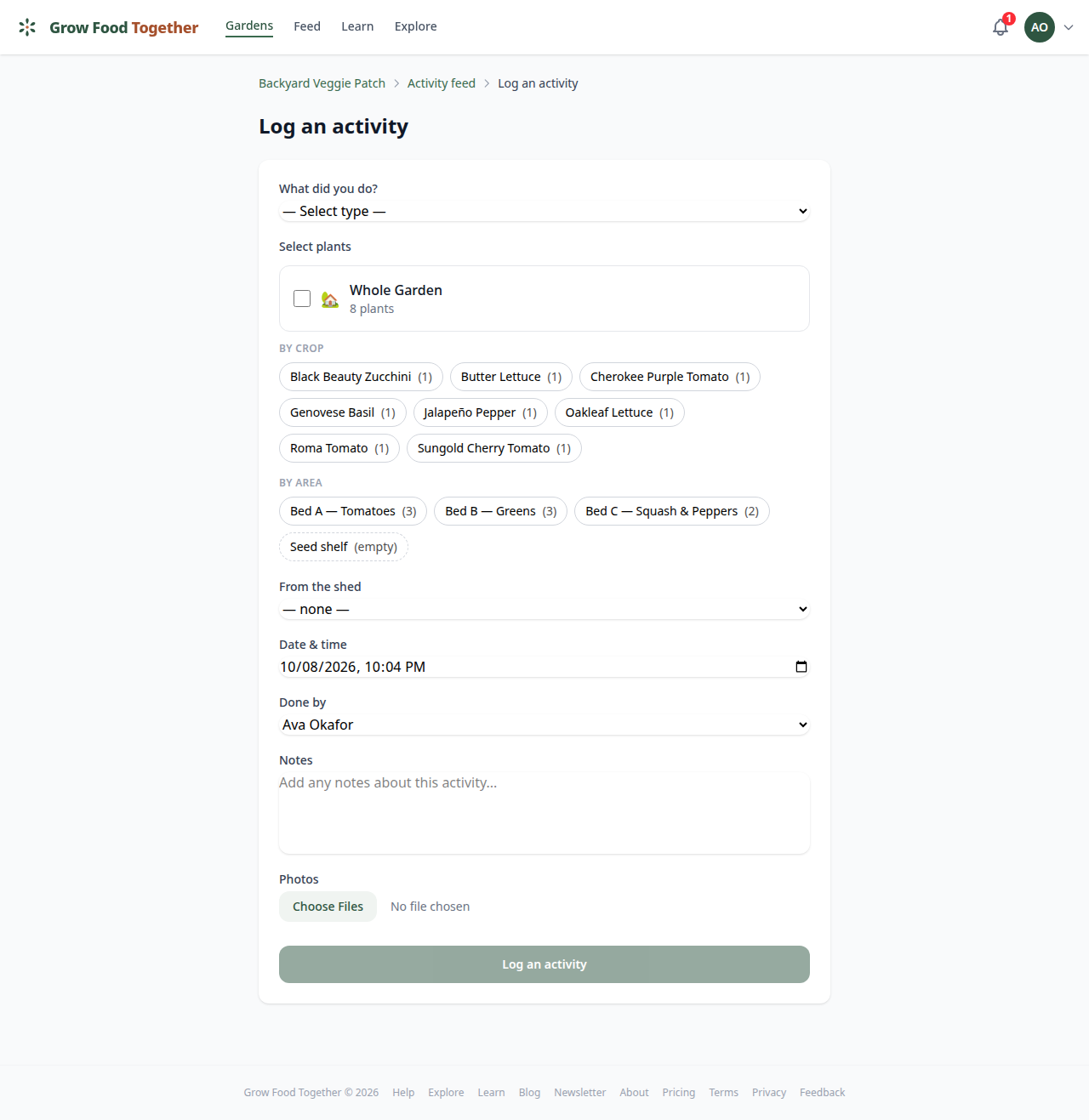
Pick from watering, pruning, fertilizing, amending, transplanting, weeding, pest control, note, photo and pulled up — plus three that belong to watering and are covered below: rain, watering skipped and watering extra — plus four seed-starting milestones covered below: sowing, germinated, potting up and hardening off.
Note is the useful catch-all. “Leaves yellowing on the south end” is a real observation and worth a row; you do not need a category to fit it into.
Two things you don’t log here
Harvesting has its own screen, because picking something has a quantity, a unit and a value, and the activity form has nowhere to put them. Use Record harvest and the picking counts towards your totals, your crop table and your return. Logged as an activity it would look right in the feed and be missing from every one of those figures. See recording harvests.
Planting is written for you when you add a plant — you cannot plant “the whole garden”, so there is nothing to log by hand. It still appears in the type list if you are editing a planting that already exists.
The four seed-starting types — sowing, germinated, potting up and hardening off — are written for you too, from the dates you record on a sowing. See starting seeds.
If you have adopted a technique that declares an action of its own, it appears in the list too — so a technique called “Spray off bugs” becomes something you can log directly, recorded as pest control.
What an entry applies to
Three choices, and this is the one worth getting right:
The whole garden. “Watered everything.” One row, applies to the place.
Particular plants. Pick as many as you like. This is what makes a plant’s own timeline worth reading later — the entry shows up on every plant you chose.
An empty area. A bed with nothing in it can still have a history: compost dug in, a tarp laid down over winter. Log it against the bed and the record stays with it once you plant into it.
You can also attach photos to any entry.
Quick log
On a plant’s own page there is a Quick log row — one tap records a common activity against that plant, without opening a form. It is the right tool for “watered this” and the wrong one for anything you want to write a sentence about.
Recording who did it
If the person who did the work is not the person typing, say so. The entry stores both, and reads “logged by” — so a manager can write up a weekend’s work by several people without the record claiming they did all of it.
Using something from the shed
An entry can name a shed item and how much of it you used. Two things follow: the item’s stock goes down, and the cost of what you used is attributed to the garden, so the spend figures reflect what you actually put on the beds rather than what you bought.
Dosing is in the unit that makes sense for the job. A gallon jug of feed can be dosed in milliliters; the stock stays in gallons and Grow Food Together converts.
Watering, rain and skipped runs
If you have a watering system set up, Grow Food Together records its runs on its own — you do not log those.
What you log is the exceptions and anything by hand:
- Watering by hand. You can say how much, in gallons or liters. Saying you watered without saying how much is fine and most common; it just contributes nothing to the water cost rather than a guess.
- Rain — a garden-wide entry, and it can suspend the day’s scheduled runs at the same time.
- Watering skipped — a scheduled run that did not really happen.
- Watering extra — a run you did over and above the schedule.
The point of the last three is that the water figures reflect what was actually used. A schedule is a plan; these are what happened.
Reading the log back
The garden’s Activity page is the full log, filterable, with runs from an automated system collapsed so they do not bury the things people did. A plant’s own page carries just its entries, interleaved with its harvests, in the order they happened.
Every entry can be commented on and reacted to, by anyone in the garden — and by anyone signed in, once the garden is public. Who can take a comment back down is in sharing and roles.
One limit worth knowing: a filtered list stops after a page of entries and says so when it has. At the size of a home garden you will not meet it.
Didn't find what you needed?
Sign in to send us a note, or read about Grow Food Together and what it costs.