Recording harvests
What to enter when you pick something, and how Grow Food Together works out what it was worth.
Updated October 8, 2026
A harvest records what you picked, from which plant, when, and how much. From that Grow Food Together works out weight and value, and pairs them against what the garden cost to run.
You can record a harvest in whatever unit you actually think in. There is no requirement to weigh anything.
Units
Pick from: leaves, bunches, pieces, grams, oz, lbs, kg, pints, quarts and cups.
Grow Food Together narrows the list to what suits the crop — a lettuce offers leaves, a tomato offers pieces and weights — but you are never locked into the suggestion.
“Pieces” displays as the crop’s own name where Grow Food Together knows it, so three apples read as 3 apples rather than 3 pieces.
Harvesting from several plants at once
This is the normal case and it has its own screen. Pick the crop, and Grow Food Together lists the plants of that crop that are currently growing. Enter a total and it splits it across them; enter figures per plant where you know them and it fills in the rest.
Countable units are split as whole numbers — you cannot pick 2.5 radishes — and the remainder is rotated rather than always landing on the same plant. Weights and volumes split fractionally.
The result is one harvest per plant, grouped together, so each plant’s own history is right while the batch still reads as a single picking.
Routines
Most gardens have a harvest they make nearly every morning: a few leaves of the same kale for the same people, picked from whichever bed looks best. A routine remembers that harvest so it does not have to be entered again.
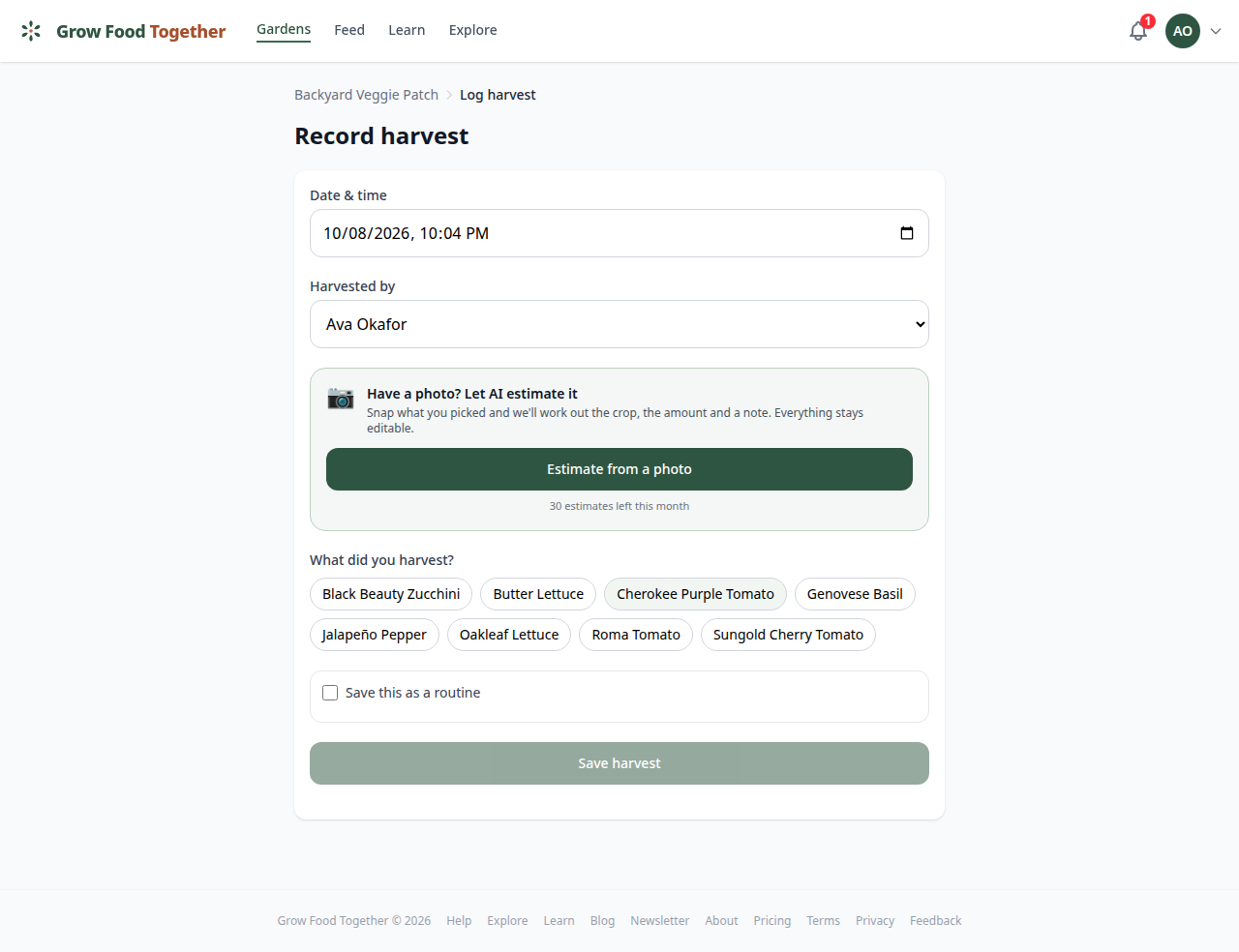
Record the harvest once, and tick Save this as a routine before saving. Give it a name if you like; otherwise it names itself from what it holds. A routine can hold several crops. A past harvest can become a routine too, from the Save as routine button on its page.
Routines belong to the garden, so everyone who can record a harvest sees them, as a row of chips on the dashboard and at the top of the record harvest screen. Tapping one opens the screen with the crops, units, beds and amounts already filled in, ready to save.
In a garden that has gone read-only the chips stay visible but do not log anything, and Manage still opens the list so you can see what you have saved.
The beds come back the way you picked them, each with its own amount, so three leaves off one bed and one off another returns as three and one rather than as an average. Change any of it: unpress a bed you did not pick from today and its amount goes with it, press another and it waits for you to say how much, or type over an amount that is not right this morning. A crop that grows in one bed has no bed to choose, so it is simply filled in.
A routine that remembers a bed you have since deleted, or one where that crop no longer grows, quietly drops it and brings back the rest. If none of its beds survive, the routine tells you the amount it remembers and leaves the choice to you.
Nothing marks a harvest as having come from a routine. It is an ordinary harvest everywhere else.
To change what a routine holds, open it, record the harvest as it should be, and tick the box above the save button, which now offers to update that routine to match. The routines page, from Manage beside the chips, renames and deletes. A routine none of whose crops is growing right now stays on the list but cannot be logged until one is planted again.
Weight
Every harvest is stored with a weight in pounds as well as the unit you typed, which is what lets Grow Food Together total a season that was recorded in bunches, cups and grams.
Where a unit is not already a weight, it needs to know what one of them weighs. There are sensible defaults per crop, and you can override them for your garden — if your chard bunches are bigger than average, say so once and every chard harvest is right.
Value
Value comes from a price for the crop, and Grow Food Together looks in this order:
- A price you set for this variety.
- A price you set for this crop.
- A general market price, where one is known.
- Nothing — the harvest is still recorded, just without a value.
Setting your own prices
The garden’s crop prices page is where this lives. Prices carry a unit, so you can say chard is $2.00 a bunch rather than translating into dollars per pound and hoping.
That matters more than it sounds. If you price something per bunch and harvest it in bunches, the exact price is used as-is — no conversion, no rounding drift. It is only when the units differ that Grow Food Together converts, through pounds.
Your prices are kept per garden, with a history, so you can see what you were valuing a crop at last summer.
What it’s set against
The garden’s analytics pair harvest value against what has been spent: water, fertilizer, pesticide, supplies, seeds, tools, and what you paid for the plants themselves. Any row there opens the records behind it, so a number you do not believe can be traced to the entries that produced it.
One deliberate gap: water costs nothing before 13 August 2026, because the app did not record watering runs until then. It is not a bug and it should not be “fixed” — the old behaviour billed for water nobody had used. It closes on its own as runs accumulate.
Fixing one afterwards
Open a harvest from the feed, the garden’s harvest log or a plant’s history and it has Edit and a delete control.
A harvest you logged from one plant edits as itself — the date, the amount, the unit, the value and the notes.
A picking that covered several crops is one record made of a row per crop, and both levels can be changed. Edit on the picking changes what belongs to the whole thing: the date and time, who picked it, the unit and the notes. Those apply to every crop in it. The amount and value of each crop are on the same screen, one row each.
Changing an amount re-estimates that crop’s value. Typing a value yourself keeps yours, and nothing later overwrites it.
Open beside a crop goes to that crop’s own harvest, which is where you take it out of the picking — remove the last crop and the picking goes with it. Adding a crop to a picking already saved is not possible; record it as another harvest on the same day and the garden’s totals come out the same.
Delete this harvest on a multi-crop picking removes the whole thing, every crop in it.
Photos
A harvest can carry photos, and it appears in the plant’s timeline on the day it was picked, interleaved with everything else that happened to that plant.
If you would rather not type numbers at all, you can photograph the picking and have Grow Food Together estimate the quantity for you — that is part of the assistant, and it is covered in the garden assistant.
No signal
A harvest saved where there is no connection is kept on your phone and sent once you are back online, with the time you picked it. How that works, and what still needs signal, is in using it on your phone.
Didn't find what you needed?
Sign in to send us a note, or read about Grow Food Together and what it costs.